Google reviews page not populating

My Reputation Tab comes up blank when I go into look at my reviews. Also can not access it from my App. Same under the google profile tab. Page loads and comes up completely white.
I have had to log out of my google profile and log back in for this to work but it is not a permanent fix for the issue as I have to do this every 2 days or so.
Please assist to help fix this permanently
-
Hi Matt,
Most commonly, this is caused by caching in the browser that you use. We recommend clearing your cache/cookies to see if that helps resolve the issue. When doing this, we suggest following the steps below to ensure it is properly cleared:
Chrome
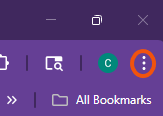
- Select the tri-dot menu in the top right
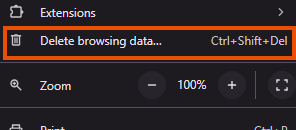
- Navigate to Delete Browsing Data…
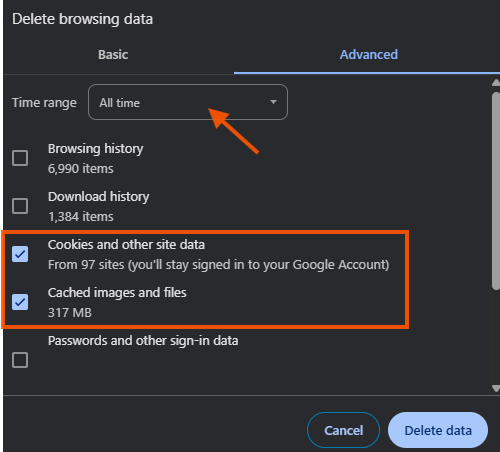
- Ensure the Time range is set for All Time and that you have both check boxes for Cookies and other site data and Cached images and files selected. Then click Delete Data
- Depending on how much needs to be deleted, it can take several moments for this to complete. Once done, close out of Chrome completely. It is important that there are no Chrome windows open on your computer.
- Re-open Chrome and log in to your Thryv software normally.
If you use another browser for Thryv and need assistance, just let me know and I can provide specific instructions for the one you use!
Thank you!
0 - Select the tri-dot menu in the top right

Please sign in to leave a comment.
Comments
1 comment