calander issues

I'm unable to see the details of my schedule calendar for any "Block Off time" scheduled time slots. Normally I can put a note or details when I block off time and by clicking on calendar can see or edit the reason for the time being blocked off. Now I click on the blocked of time slot and nothing opens. I have scheduled duties on the calendar this way and now the details are unable to be seen. This is a problem.
-
Hi Daniel,
There was a small issue with the Calendars yesterday that has since been resolved. It is likely you are still seeing a cached version of this issue. Could you confirm if the issue resolves after following the steps below? I am including steps on how to clear cache/cookies in Chrome, but if you use another browser, just let me know!
Chrome
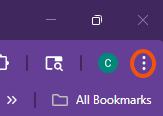
- Select the tri-dot menu in the top right
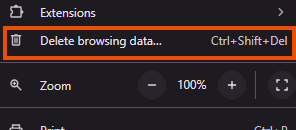
- Navigate to Delete Browsing Data…
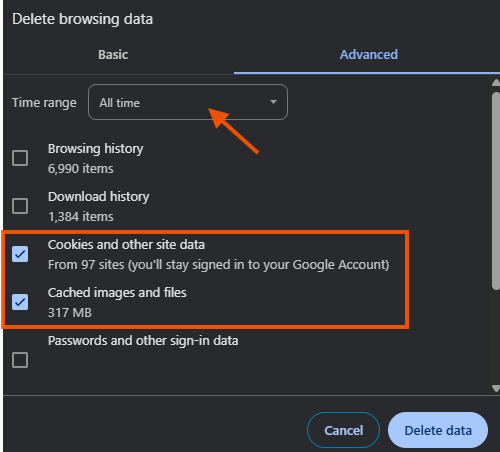
- Ensure the Time range is set for All Time and that you have both check boxes for Cookies and other site data and Cached images and files selected. Then click Delete Data
- Depending on how much needs to be deleted, it can take several moments for this to complete. Once done, close out of Chrome completely. It is important that there are no Chrome windows open on your computer.
- Re-open Chrome and log in to your Thryv software normally.
0

Please sign in to leave a comment.
Comments
1 comment