Update Appointment

When I click on an existing appointment to update the system freezes up and will not allow me to pull up the appointment
-
Hi Tammy,
We are experiencing a partial outage on the Calendar this morning. Our team has implemented a fix and are monitoring to confirm if this resolves the issue. In the meantime, using an "incognito" or "private" browser tab will allow you to use the software with no issues.
I will update here when we get confirmation from them again.
0 -
Looks like that it got resolved quickly! We have confirmation that its operational now. You might need to clear your cache/cookies to ensure your browser isnt showing you the "incorrect" version of the site but you should be good to go!
0 -
This is not resolved on my side. I still can't get into my existing appointments to update. Even after deleting cookies, cache.
0 -
Hi Tammy -
When deleting cache/cookies, could you confirm if the following steps are completed? I have included the steps for Chrome, but if you use another browser, just let me know!
Chrome
-
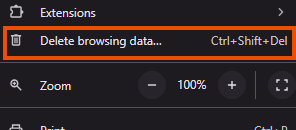
Select the tri-dot menu in the top right

-
Navigate to Delete Browsing Data…
-
Ensure the Time range is set for All Time and that you have both check boxes for Cookies and other site data and Cached images and files selected. Then click Delete Data
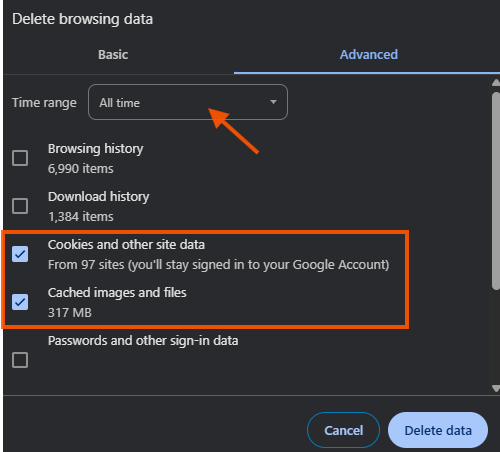
- Depending on how much needs to be deleted, it can take several moments for this to complete. Once done, close out of Chrome completely. It is important that there are no Chrome windows open on your computer.
- Re-open Chrome and log in to your Thryv software normally.
0 -
Select the tri-dot menu in the top right
-
I did follow all these steps and it still freezes up when I try to click on an existing appointment. My computer is very new so I don't have hardly any cookies or cache saved up. What is my next step?
0 -
Tammy -
I am sending you an email with more instructions. It will allow us to troubleshoot this a little faster that way.
0 -
I am back from lunch and errands
0 -
Sounds good! I sent over that email to you :)
0

Please sign in to leave a comment.
Comments
8 comments