Help

How do I total the clients seen in 2024.
-
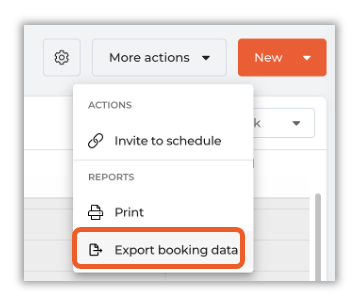
Great question Edna! In order to total the clients seen in a given time period, first you'll need to export your appointments. Navigate to your calendar, and in the top right click on More Actions>Export Booking Data
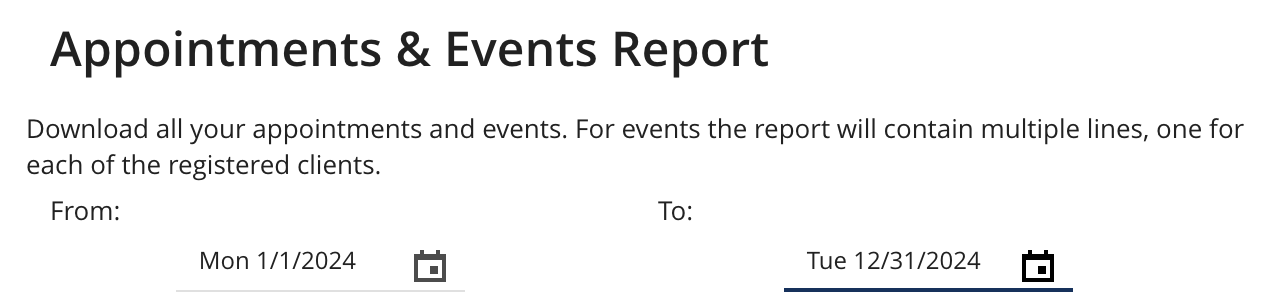
In the pop-up that appears, make sure the date range is set, in this case for the year 2024.
Note that if the amount is too large you may need to break it up into quarters or months.
Locate the column for Client Name (Column C). Sort the spreadsheet by this column. Then, to reduce it from total appointments to just clients seen, under Data click on Remove Duplicates

In the window that pops up, ensure that only Client Name is selected. This will reduce the list to one appointment per client. Highlight the client name column again, and the Count in the lower right corner will be the total clients seen in that time period.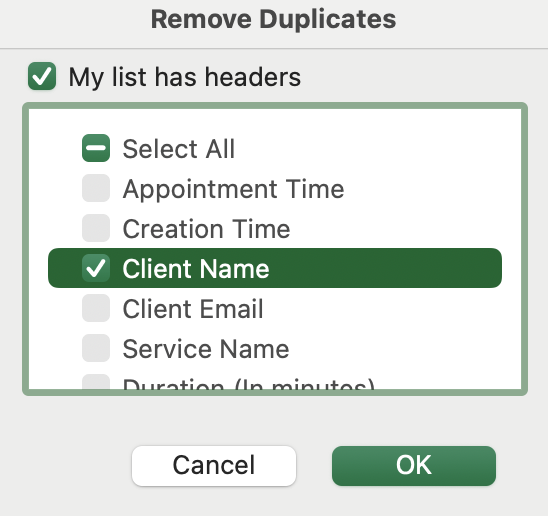 0
0

Please sign in to leave a comment.
Comments
1 comment